Building ad tools across Meta surfaces
(1).png)
Project overview
I'm part of the Small Business Ads team at Meta. Our team owns the ad tool on Facebook that helps small businesses expand their reach through advertising. My team built an ads platform with the goal to enable ad tools on various Meta apps, built on top of a unified framework. In 2023, we successfully built a native ads tool within the Messenger app, and in 2024 we're doing the same for WhatsApp business app.
This project will provide a detailed overview of our product strategy, the process of building ad tools from the ground up, and my personal role in the development of ad tools across surfaces.
Over the past year, I developed the ads platform to help teams integrate ads into their surfaces. I embedded myself in my partner teams' models, working closely with them to understand their user needs and challenges. This allows us to customize ad creation to meet their specific platform requirements.
Team
25+ stakeholders across 3 product teams.
2 Product Designers, 1 Content Designer, 2 Product Managers, and 15+ engineers.
Meta offers advertising solutions to help businesses reach new customers across all its platforms, including Facebook, Instagram, Messenger, and WhatsApp.
Businesses of varying sizes use Meta platforms to promote their business, both organically and by leveraging ads.
We broadly categorize these advertisers across 3 segments:
(1).png)
In order to support these users of varying sophistication, Meta has two categories of tools:
My team owns the Lightweight ads tool(LWI). This is a simple advertising tool for small businesses to create, launch, and manage ads. It's accessible within the Facebook app and also on web and mobile browsers, but it enables creating ads that can show up across all Meta surfaces including Facebook, Instagram, etc. This product has been de facto solution for small business ads at Meta for 10+ years.
%201(2)(1).png)
As stated earlier the Basic advertiser is the primary persona our tool is deisgned for. Let’s zoom in on this user to understand their needs.
The Basic advertisers are small business owners (1-5 employees) who wear every other hat in their company, from housekeeper to accountant and marketer. They are jewelry and fashion designers, bike repair shop owners, IT consultants, food truck operators, and realtors.
(1).png)
Over the last 10 years, the Facebook app has grown to include a broad family of apps like Messenger, Instagram and WhatsApp. Different users use different apps as their primary platform to promote their business and connect with their users.
A singular ad tools app integrated within Facebook didn't fully support the need of our users on the other Meta apps. These Meta app teams realized the need to meet their users where they are and support ad creation natively within their apps.
Teams generally took one of two approaches:
Approach 1
Approach 2
(1).png)
My team identified the proliferation of these two approaches and the need for a better solution.
As a result, we developed an Ads platform that can be embedded into any Meta surface, so teams don't have to reinvent the wheel and invest in creating their own ad tool from scratch.
This would effectively allow teams to build a native experience like approach 1, but leverage a consistent flow powered by LWI – the Meta standard ad tool (approach 2).
(1).png)
(1).png)
I broke down ad creation and management into individual steps and identified how we could break down our single monolithic application into discrete and logical "lego blocks".
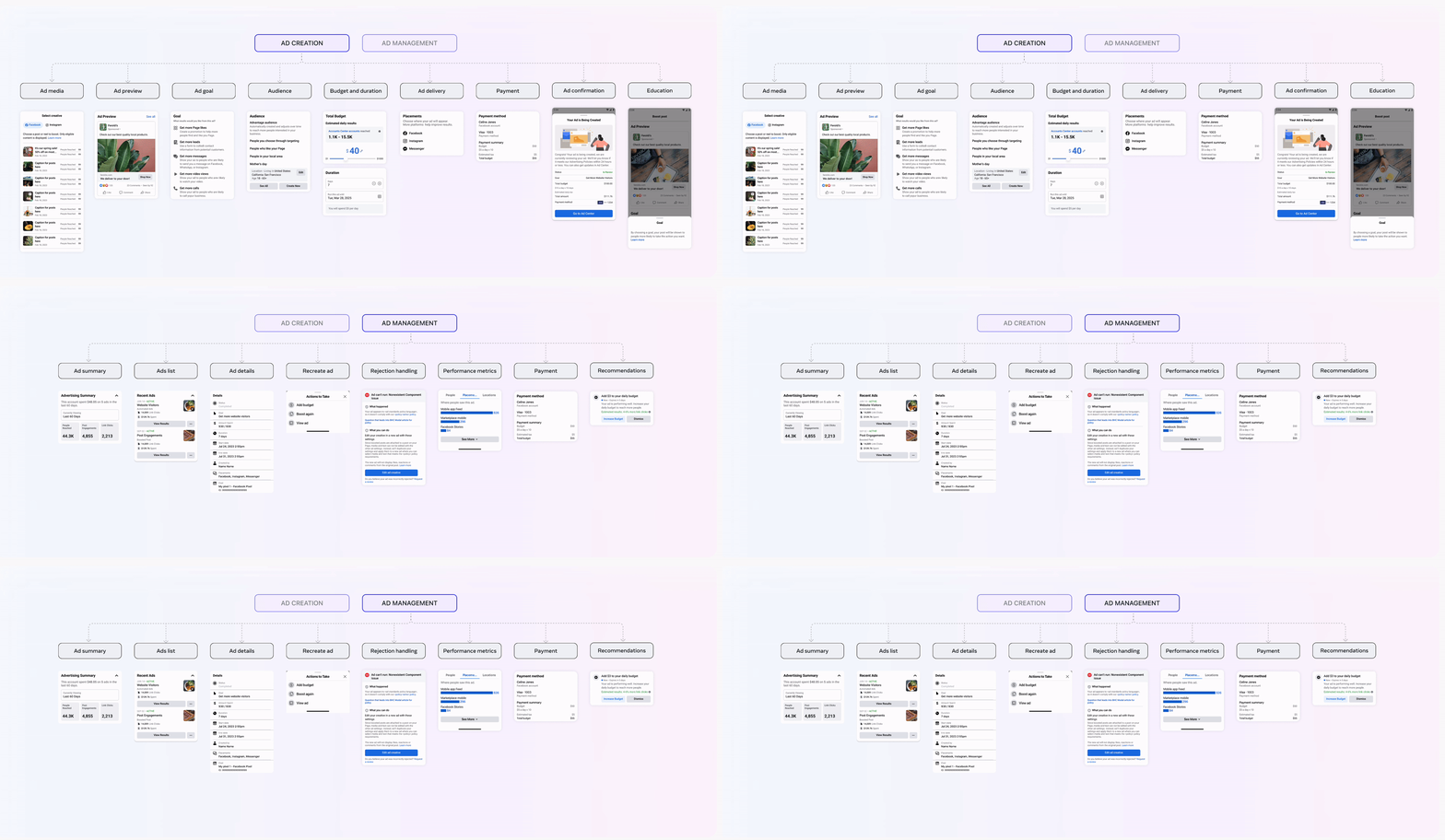
This is where i identified the two primary tenets for our platform
Composability
The blocks had to work together as pluggable legos, and made available as a "menu of options".
A partner team may not to replicate the entire ad functionality within their app, and should be able to choose a selection of blocks to compose the right experience for their app.
Adaptability
The few pixels I did draw was painting the vision of how our blocks could be adapted by our partner teams to drive a consistent ads experience, while still feeling native within their own app.
(1).png)
In our conversations, we identified that Messenger was in a phase, where they running experiments using Approach 2, and were considering building a native ads tool (Approach 1). We convinced them to parter with us, and build on the platform, and effectively steered them towards Approach 3.
Small businesses utilize Messenger by engaging with customers through messaging to help answer their questions, and make sales. They are able to reach users by:
(1).png)
Messenger only had an entry point for ads, and sends users to Facebook ad tool to create ads.
This entry point resulted in tremendous demand and messaging ad creation attempts increased by 38%. This showed strong user intent.
However, ad completion rates were significantly lower through Messenger than on native ad platforms. Facebook offers a variety of ad types, but finding the one that leads to Messenger can be challenging. This issue often results in users dropping off or selecting less suitable ad types, leading to suboptimal outcomes for their business.
(1).png)
Messenger became out first user. Over the next 6 months, I embedded myself within the Messenger team, to bring my expertise in ads to build a native ad solution within Messenger, leveraging the platform I designed.
Goal: Empower messaging-active small businesses to discover, create, optimize, and manage performant ad campaigns right from Messenger.
(1).png)
I organized a design sprint bringing together 25+ stakeholders across 2 organizations/3 teams. This sprint turned out to be extremely crucial in building relationships and laying the groundwork for this 0-1 project.
This sprint helped foster a shared understanding of our goals, unique advertiser problems on Messenger, each team's long-term product strategy, MVP feature prioritization, and early design explorations. This sprint helped us uncover differing assumptions held by each team that had been getting in the way of alignment. At the end of this process, we came together as a single team with a unified goal.
When my team collaborates with partner teams, we contribute our core ads expertise, while the partner team provides more specific knowledge in their vertical and surface areas. I worked with my team to document general ad use cases, while the Messenger team documented specific "messaging ad" use cases and North Star solutions.
We evaluated each feature by type of impact (adoption, completion, performance, retention); experience (needed, expected, nice to have); relevance to longterm strategy (key, not integral); and eng/design effort (low, medium, high). We then prioritized each item (MVP, fast follow, future) and discussed items with questions or differing opinions.
(1).png)
During the design sprint, we heard from people, platform, and product experts share insights on who we’re building for, what we’re building into, and why we’re building, we distilled this into guiding principles that will guide this work:
The Messenger designer and I tagged team on the design effort. We broke down the work based on the different sub-steps of the user journey. There was a primary DRI for each part of the design, but we both collaborated very closely, giving each other feedback to ensure our design decisions stay aligned, and the entire experience stays cohesive.
.png)
I was primarily focussed on the Ad creation and the Ad management phase, as those are the core pieces that the platform provides. Let's focus on those two phases of the journey and look at how we designed them.
This is what the final version of the end to end ad creation journey looks like, as implemented in Messenger.
.png)
As an example, I will walk you through one of the sub-journeys and how I went through multiple iterations to go from the lego block to the final version, which natively works within the Messenger design system and interaction model.
(1).png)
(1).png)
.png)
The "audience details" sub-journey itself had 6 different states with multiple design decisions and iterations across each one of them. But lets look at the "Edit audience" screen where bulk of the interaction is happening.
.png)
(1).png)
.png)
.png)
This is what the final version of the end to end ad creation journey looks like, as implemented in Messenger.
.png)
As an example, I will walk you through one of the sub-journeys and how I went through multiple iterations to go from the lego block to the final version, which natively works within the Messenger design system and interaction model.
.png)
.png)
.png)
The "ad insights" sub-journey itself had various states with multiple design decisions and iterations across each one of them.
.png)
.png)
.png)
.png)
In Q4 2023, we launched the Messenger ad creation experience. This resulted in an annualized revenue impact of approximately $20M.
By introducing the native ad experience in Messenger, ad completion rates increased from 1.3% to 4%. This is a substantial improvement over the previous experience, but it still falls short of the ~11% benchmark on the Facebook ad tool (which is to be expected, since the Facebook ad tool has been optimized over 10 years).
In early 2024, I transitioned from this work to focus on scaling our ads platform on WhatsApp for iOS. However, the Messenger team continued to carry out funnel analysis and optimize the experience. Their planned work involved enhancing top-of-the-funnel adoption and introducing features to improve user comprehension and retention.
Starting this year, I embedded myself in the WhatsApp team to implement a native ads experience in the iOS WhatsApp Business app using the Ads platform. Currently, the WhatsApp app deep-links to the Facebook ads tool for ad creation.
.png)
Over the past 1.5 years, I have been immersing myself in partner teams. If there's one skill I've had to develop and use extensively, it's the ability to collaborate with cross-functional partners spread across different organizations.
This requires quickly adapting to different platforms and their design systems, understanding unique user needs and challenges, and integrating the ad platform to meet these needs.
This often involves working with differing opinions, goals, and assumptions. Bringing everyone onto the same page is crucial for driving 0-1 projects as smoothly as possible.
Documentation is a powerful tool that streamlines communication and fosters collaboration among team members. Building ad tools in Messenger was a significant project that required many alignment discussions. Here are a few examples of the most helpful documents:

.png)